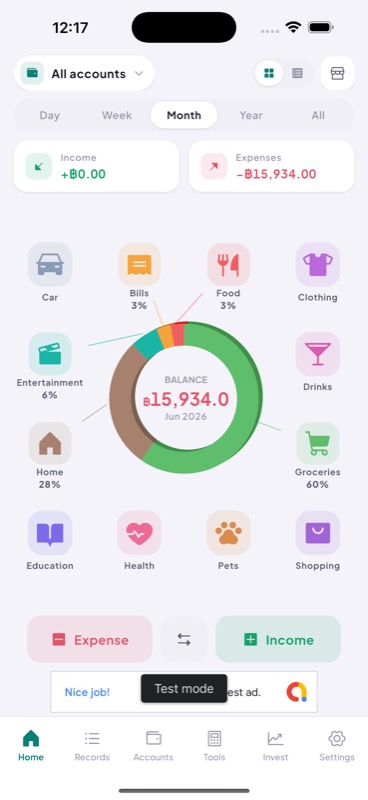
Log expenses in seconds — choose a category, enter the amount, done. Weekly and monthly summaries show exactly where the money went.
Tally is a personal expense tracker built around a single insight: most expense apps are abandoned because entry is too slow. By the time you get home and open the app, you’ve forgotten what you bought at lunch.
Tally makes logging fast enough to do at the moment — pick a category icon, type the amount, hit save. Three taps. The entry is done before your receipt prints.
No account required. All data is stored locally in SQLite on the device. There is no signup, no server, no data export to a cloud you don’t control. Your spending data stays on your phone.
Category budgets. Set a monthly budget per category (food, transport, entertainment). A progress bar fills as you spend. It turns amber at 80% and red when you’re over. The bar is visible on the home screen — you don’t have to navigate to a summary to know where you stand.
Weekly and monthly views. A bar chart shows daily spending for the current week. The monthly view shows total per category with a ranked list. Nothing more complex than that — the goal is a clear answer to “where did my money go?” not a financial planning tool.
SQLite via the sqflite Flutter package stores all expenses locally. The UI uses Flutter’s built-in charting capabilities (painted with CustomPainter) for the spending bar chart — no third-party chart library dependency. The entire app works offline; there is no network call anywhere in the codebase.